
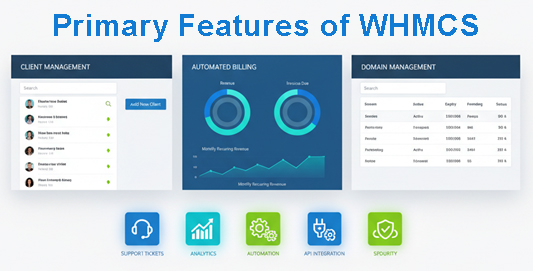
Running a web hosting or SaaS business involves dealing with a gigantic amount of moving parts – client accounts, re-billing, support tickets, domain registration, service provisioning. Doing all of this manually is a recipe for mistakes, missed payments and overworked staff.
WHMCS (Web Host Manager Complete Solution) is an automation platform that is created specifically to address these challenges. Trusted by more than 35,000 businesses across 200 countries, centralises the management of clients, billing, provisioning and support to a single system. This allows hosting providers, domain registrars and SaaS companies to automate and eliminate their workload and at the same time scale their operations effectively.
Whether you’re provisioning a new hosting account, generating recurring invoices, or managing domain renewals, WHMCS takes the heavy lifting out of it, so you can focus on growing your business. Here’s a closer look at the main features that make WHMCS an important tool to service based businesses.
Client Management & CRM
WHMCS is a central place of managing all customer information and interaction. Each client profile includes contact details, service history, payment details and communications histories to give your team a full picture of each customer relationship.
Important client management capabilities are:
- Centralized Customer Profiles: Store and access client information including names, email addresses, and billing information as well as any services they are associated with is one.
- Service and Product Tracking: There should be a list of all active, suspended or terminated products and services for each client account.
- Communication History: Keep track of all communication history of the support tickets, invoices, quotes and emails relating to a client, in order to ensure continuity across your team.
- Custom Fields: Store how additional information is stored about clients that is not in the standard fields such as company registration number or preferred mode of contact.
This way that your transactions are centralized will eliminate the need to dig through multiple systems or spreadsheets. Your team will have quick access to the information they need in order to provide better and more personalized service.
Automation of Billing and Invoicing:
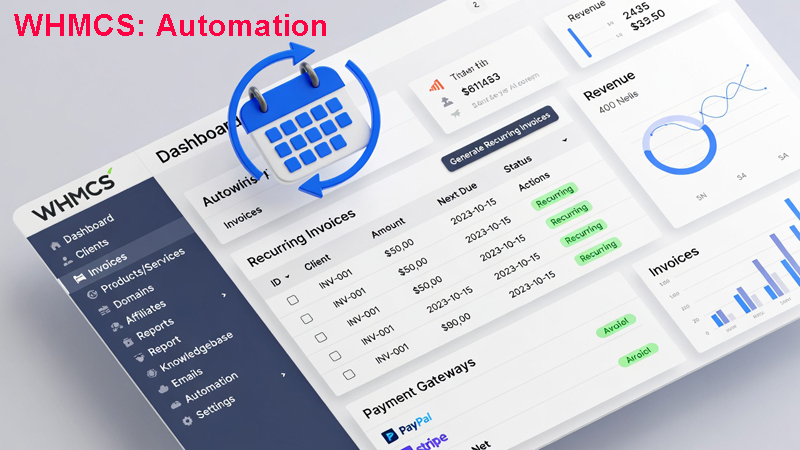
One of WHMCS most potent features is that it can be used to automate the entire billing process. The platform takes care of everything from creating an invoice, to payment collection, making sure you are getting paid on time, with the minimum amount of manual intervention
The Way Billing Automation Works
WHMCS makes use of an orderly billed process that takes place in the following steps:
- Ordering: A client makes an order or an admin makes an order for him or her.
- Invoicing: The system creates the invoice depending upon the order detail and the billing cycle.
- Payment: In the invoice the client makes the payment via the payment gateway according to his/her convenience.
- Provisioning: WHMCS will be used to provoke the service (if applicable) automatically when payment is been confirmed.
Recurring Invoice Generation in WHMCS
Based on WHMCS’s logic for billing, the system will analyze the Next Due Date value of all active & pending services. * When the cron job is used to get automation jobs run out everyday, then it:
- An examination of whether all services have due date in the timeframe of configured Invoice Generation.
- Makes sure that there is no duplicate invoice for that service and due date.
- Creates a new invoice if the following is true.
- Sends the automated notification of invoice at client.
- Increases the Next Due Date by one billing cycle.
This allows for high continuity of billing without the manual creation of the invoice even for hundreds or thousands of services that are being billed on a recurring basis.
Flexible Billing Options in WHMCS
WHMCS supports more than one billing cycle including:
- One-time
- Monthly
- Quarterly
- Semi-annually
- Annually
- Biennially
- Triennially
The WHMCS billing also handles:
- Tax Calculations: Automatically apply tax rates by the location of the client or the type of product chose.
- Coupons and Promotions: Create discount codes to new customers or promotions.
- Credit Management Issue credits, refunds, apply account balances to invoices.
- Late Fees: Automatically apply late fees to late invoices based on your setup.
Payment Gateway Integration into WHMCS
WHMCS is integrated with several different payment gateways, which are split into:
- Merchant Gateways: Telephone card information is stored in symbiosis in WHMCS database. Examples include Authorize.net, BluePay, Forte and Moneris.
- Third-Party Gateways: Seeing the provider’s web site for payment for off-site? Examples are 2CheckOut, Paypal Basic, Stripe and WorldPay.
- Tokenization Gateways: Minimize the task of being PCI compliant by storing transaction tokens instead of actual credit card information. Examples are Stripe, PayPal Payments, Authorize.net CIM and SagePay.
- Manual Gateways: Support offline payment methods, such as bank transfer, direct debit and mail in payments.
This is to help you offer your clients the payment methods of their choice without jeopardizing your protection and compliance standards.
WHMCS Product & Service Provisioning
WHMCS is a good tool at automating setups and management of hosting accounts and other types of digital stuff. When a client makes a purchase, the platform can create his or her account, configure settings, and send login credentials immediately – and with no manual intervention.
WHMCS Automated Provisioning
WHMCS integrates with the top control panels and service providers to make an instant account creation. The platform can be used to support hundreds of apps and integrations that include:
- Control Panels: cPanel, Plesk, DirectAdmin etc.
- Cloud Platforms AWS, DigitalOcean, Different VPS providers.
- Service Providers: Domain registrars, SSL certificate providers, special hosting platforms.
When payment is verified for a product that was set to automatically provision, WHMCS interacts with the respective service provider to user account immediately. This has the benefit of reducing wait times for customers as well as removing the work required to operate the process manually for your team.
Lifecycle Management to WHMCS
In addition to the initial provisioning, WHMCS also automates service lifecycle management based on billing status:
1. Suspension: When a service has passed the number of days that you have set under your Suspension Days setting, WHMCS is able to suspend the account automatically. The system reads the Next Due Date value and checks if automated suspension is active then it performs the suspension via the provisioning module.
2. Unsuspension: When a client repays an overdue invoice for a service WHMCS is able to automatically unsuspend the account. The system checks if the service was suspended due to non payment and if enabled, triggers the unsuspension command.
3. Termination For your services that go unpaid past the amount of days that you set for the Termination Days WHMCS can also terminate the account according your set up undertakes to free up resources and keep accurate records.
This automated lifecycle management has benefits, which include performing consistent and automatic policy enforcement without the need to have staff members monitoring and manually updating the statuses of the services.
WHMCS Domain Management
For businesses that are offering domain registration services, WHMCS provides full domain management functionality that is built right into the platform.
WHMCS Domain Registration & Transfers
WHMCS integrates with domain registrar modules to automate:
- New Registrations: Process, just after the clients place an order.
- Domain Transfers Process: Automated EPP code requests and status tracking.
- Renewals: Create renewal invoices before tandem expire, and indemnity automatically renewal domains when the payment has been issued.
According to the documentation, WHMCS has the possibility to “set up automatic domain registration on a per-extension basis, allowing using different registrars for different TLDs.” This is by having one registrar on the com domains while having another one on the UK domains and optimizing on price or features depending on the extension.
Automatic Domain Synchronization in WHMCS
WHMCS has support for automatic synchronization of domains to sync domain records. The following can be done automatically by the domain sync task:
- Updating expiration day’s on renewal externally
- Receive updates of incoming transfers sync status
- To impress your WHMCS as it is actually with your registrar
This removes the possibility of differences between what you have on your bills and what actually registered in the real world (which minimizes support questions and billing disputes).
WHMCS Domain Management Tools
Additional domain features are:
- WHOIS Updates: Directly update domain contact information from WHMCS.
- Nameserver Management: Manage DNS nameservers for domains.
- Domain Locking: The egistrants can tell a registrar to lock the domain to prevent domain transfer to another company.
- EPP Code Retrieval Request the authorization codes for outbound transfers.
- DNS Record Management: Presence of ability of creating and updating DNS records for the support of some registrars which supports this feature.
In-Built Support System of WHMCS
Rather than needing separate help desk software WHMCS contains a full featured ticket management software with a focus on hosting and service business.
Ticket Management Features
According to WHMCS documentation, support tickets provide “an easy way to handle one-on-one communications with your clients using WHMCS’s fully-featured ticket desk.” The system includes:
- Threaded Discussions: We can see the complete history of conversation of the client.
- Private Admin Notes: Add internal notes for staff members only that can see the notes and have the ability to tag certain admins to draw their attention.
- Ticket Flagging: To flag tickets to certain members of staff to make them aware of a ticket.
- Priority Levels: Prioritize (Low, Medium, High) to organize the workload.
- Department Organization: Route tickets to special departments tailored staff access.
- Predefined Replies: Define template replies to frequently asked questions to save time.
- File Attachments: Allow the clients or the staff to attach files while replying to the ticket.
WHMCS Knowledge Base Integration
WHMCS can be used to automatically recommend relevant articles from the knowledge base to clients while they submit tickets. This self-service functionality helps to reduce the volume of those tickets by helping the customers to find the answers on their own.
Automation & Efficiency Tools in WHMCS
The support system is made up of a number of automation features:
1. Scheduled Actions: Set scheduled actions for individual tickets, for example a change in priority should be done and then it should be re-assigned to other staff or send response automatically on scheduled date or after a specified time period.
2. Escalation Rules: Define automatic behavior for the tickets that remain in a specific state for an excessive amount of time. For an example, automatically escalate high priority tickets which have not been answered within two hours.
3. Auto-Close Inactive Tickets: Close tickets automatically once they have been inactive for a period of time (configuring this option keeps your ticket queue clean & easily manageable)
4. Ticket Ratings: Allow your clients to rate individual staff responses on a 1-5 star scale, and help you measure the quality of your support and identify high performing staff.
Customization in WHMCS that is Developer Friendly
WHMCS has a huge amount of customization available to those businesses with unique requirements or technical capabilities.
API Access – WHMCS
The WHMCS API is the process through which external applications are able to interact with your WHMCS installation through programming. You can use the API to:
- Create and/or update client accounts
- Generate invoices
- Provision services
- Retrieve reports
- Manage domains
This allows you to integrate with other tools built, with integrations into mobile applications or third party service that adds functionality to WHMCS.
Hooks System in WHMCS
WHMCS has a system of hooks to which developer custom code can be executed at specific points during the application lifecycle. The platform provides lots of hook points for invoices and quotes alone including:
- InvoiceCreation: Hook runs when invoice is initially created giving you the option to change items on line items first before being finalized
- InvoiceCreated: This is executed after the execution of invoice released to the client.
- InvoicePaid: Is triggered by a confirmation of the payment on an invoice
- AddTransaction: It is implemented when creating any transaction (payment or refund).
These hooks enable complex customizations without modifying the files of WHMCS itself, which means that your customizations will not be lost during the updates.
WHMCS Custom Modules
There are a number of ways in which WHMCS can be extended by developers using custom modules:
- Payment Gateway Modules: Integration with Payment Providers not listed with WHMCS’s default payment providers.
- Provisioning Modules: Interact with proprietary/ specialised hosts platforms
- Registrar Modules: Convert another domain registrar support.
- Server Modules: Enable the practice of managing the custom server configurations
The WHMCS marketplace also has hundreds of third party extensions for additional function such as advanced reporting, marketing automation and enhanced client portals.
WHMCS Reporting & Analytics
In an effort to understand how your business is performing, you need access to accurate data, and you need to have access to it on time. WHMCS has native reporting functions that can be used to monitor important metrics and look for trends.
While any particular reporting features depend on the individual version and configuration of WHMCS, visibility provided by WHMCS includes:
- Reports on Revenue: Know the revenue on your target products, bills or time period.
- Client Growth: Monitor client growth, signups & cancellations, total changes in client base.
- Ticket Performance: analyze the volume of the support tickets, the response times, and the performance of the staff through ticket feedback scores.
- Product Popularity: Find out your best selling products and services.
- Payment Gateway Performance View balances and transactional information for integrated payment gateways (such as Stripe, PayPal, etc.).
Activity logs throughout the system provide an audit trail of administrative activities and changes by clients as well as automated processes to assist you in troubleshooting issues and meeting compliance requirements.
Why WHMCS is Important to your Web Hosting Business
The above-mentioned features work together to provide an end-to-end business management platform that provides tangible benefits:
1. Saves Time: Automation eliminates the time-consuming and tedious tasks involved in manual processes such as invoice generation and account setups or payment processing. Things which used to take hours happen instantaneously and unconsciously.
2. Reduces Errors: The manual data entry and calculation of invoice is prone to error. WHMCS’s automation processes are bound to deliver consistency and accuracy to all client transaction.
3. Improves Cash Flow Automated invoicing and payment reminders can help ensure timely payment and improved cash flow. Recurring billing makes it possible for subscription revenue to be collected automatically, without having to ask clients to manually pay for it each cycle.
4. Increases Scalability: It is not an easy task to handle 50 clients at a time manually and 500 or 5000 is almost an impossible task. WHMCS scales up easily as your business expands and is able to cope with greater volumes of orders without a respective growth of staff.
Professional Client Experience Automated welcome emails, instant account provisioning and organized support give the client a polished and professional experience that build client confidence and loyalty.
Frequently Asked Questions
What is WHMCS used for?
WHMCS is a full automation platform for Web hosting companies, domain registrars and SaaS companies. It deals with clients relations, automates billing and invoicing, provisions services, and handles support tickets and integrates with payment gateways and service providers.
Is WHMCS only for web hosting companies?
No. While WHMCS was built originally with web hosting providers in mind, it’s also used in a wide variety of businesses such as domain registrars, SaaS companies, VPS providers, SSL certificate resellers and any business offering recurring digital services or products.
Does WHMCS support recurring billing?
Yes. WHMCS is great when it comes to billing for recurring use with billing cycle support (monthly, quarterly, annually, etc.) The system automatically generates invoices from servicing renewal dates and payments are accepted from integrated payment gateways without any manual intercession.
Can WHMCS automatically create hosting accounts?
Yes. WHMCS integrates with popular control panels like cPanel, Plesk, and DirectAdmin, as well as cloud platforms and VPS providers. When a client completes a purchase, WHMCS can automatically provision the hosting account and send login credentials immediately.
What are the available payment gateway with WHMCS?
WHMCS has support for over 100 payment gateways in 4 categories including merchant gateways (Authorize.net, Moneris), third-party gateways (PayPal, Stripe, 2CheckOut), tokenization gateways (PayPal Payments, Stripe ACH) and manual gateways (bank transfer, check). You may also do custom gateway module of providers that are not in default.
Is WHMCS customizable?
Yes. WHMCS is extremely customizable with complete access to an API, hooks system to execute custom code at specific points in the system and the ability to create custom modules. The WHMCS market place also provides hundreds of 3rd party extensions for more functionality.
Does WHMCS support ticket system?
Yes. WHMCS has a comprehensive ticket management system, threaded discussions, private notes, flagging of tickets, priority management, department management, predefined replies, automatic closing of inactive tickets and client rating functionality.
How secure is WHMCS?
WHMCS has many security features such as 2-Factor Auth, admin permissions (role-based access control), logging of activities, and security of payment details. For tokenization gateways WHMCS is only storing the transaction token and not the full credit card number, reducing the requirements for PCI compliance.
Can WHMCS integrate with cPanel and other control panels?
Yes. WHMCS works with such well-known control panels as cPanel, Pleask, DirectAdmin and many others. These integrations enable you to provision, suspend and terminate accounts based on billing status automatically.
Is WHMCS suitable for SaaS businesses?
Yes. While WHMCS was originally developed for use as a hosting provider, many 21st century SaaS companies use it to deal with their subscriptions, billings and customer support. The flexibility of the platform and access to APIs makes it workable for a number of subscription-based business models.
Streamline Your Business with WHMCS
Running a hosting or a service business doesn’t need to be drowning into administration tasks. WHMCS combines client management, billing automation, service provisioning, domain management and support into a single integrated platform – removing the need for multiple different disconnected tools.
With over 35,000 businesses in the world using WHMCS, it’s proven itself to be capable of anything on any scale. Whether you’re a startup hosting provider or an established registrar with thousands of domains in your name, WHMCS has the automation and organization to help you run efficiently and grow confidently.
Are you willing to see the way that WHMCS can change the way your business is run? Explore all of the things that the platform can do and see how automation can free your team up to do what they do best – serve your clients and grow your business.